The Test Site.
We
test it, and tell ya all about it.
By:
Everyone At BizNet
everyone@biznetonline.com
|
The Test Site. |
|
||

What Is This?
|
An Ink Jet
Cartridge On Life Support? No! It's A.... If you have
a HP Inkjet printer then this is a little "thingy" you need to
know about. This device is
commonly referred to as a "Snap and Fill" adaptor. Snap and fill adapter? It's really very simple. If you refill your own cartridges, or are thinking about it, then do yourself a big favor. Spend a few bucks and get one of these things. |
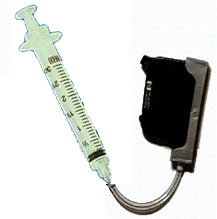 |
This clever device
lets you refill the cartridge Without Having To Open The Cartridge Or Make A
Hole In It.
Come on! Refill
without making an opening? No,
really. It not only works, it works
very easily. You just
"snap" the ink cartridge into the holder.
Then after you have put some ink into the syringe, you just hold the
cartridge upside down, and pull back on the plunger.
Back. Not in? Right.
At first you pull back (just a little, you will see the air coming
through the clear hose, when only ink is coming out of the cartridge, and the
air is in the syringe, STOP), this makes sure all the air is out of the
cartridge and the filling hose. You
then turn things upright. The air
now goes to the top of the syringe, with the hose that is connected to the
cartridge now at the bottom. This
way, when you now slowly push the plunger in, you only are forcing ink into the
cartridge. No air (stop pushing
before you force all the ink out of the syringe.
If needed you can get more ink into the cartridge by repeating the
process, but do not force the air back into the cartridge).
Forcing?
Yes... This thing literally
forces the ink into the cartridge right though the print head, and into the
cartridge. Forces it...
Yes, and it is easer then it sounds.
Too much ink?
To keep from pushing too much ink into the cartridge, just use a slow and
steady pressure to push the ink in. When
you feel the pressure (or the effort needed to push the ink in) increase, STOP.
You have filled the cartridge. Do
not over fill the cartridge. It
will not help you and if you do not "rupture" the internal "ink
bag", the cartridge and air pressure will only force the overfilled ink out
all over the place. In this case
less is more.
After filling the
cartridge up, you just put a piece of tissue paper around the holder, and the
filler hose (to catch the small amount of ink that will seep out of the filler
hose), and after backing off on the plunger just a little (to release the
pressure), you just pull the now full cartridge right out of the holder.
You can then just empty any unused ink, from the syringe back into the
inkbottle. By the way…
Do yourself a favor. Wear
rubber gloves. It saves having to
wash your hands after you’re done. And
don't do this over the living room carpet.
Accidents do happen. Yes,
even I have knocked over an inkbottle.
Personally when I
get a new cartridge I put it on a postage scale and note the weight.
When I refill it, I can see if it's full by re-weighing it.
So does this work?
Yes.
I got my Snap and Fill at the local computer fair from a place called The
Ink Dot ( www.theinkdot.com ).
I have refilled the same cartridge over three times without any problems.
Before it's empty.
Also do yourself a
favor when refilling any ink cartridges. Do
it before they are empty. Not only
will the cartridge last longer, but you will save needless damage to your print
heads, from trying to print with no ink.
 |
 |
 |
| Because It's The Right Thing To Do. | ||
Send mail to editor@biznetonline.com with questions or comments about this web
site.
Copyright © 1997 ~BizNet OnLine Magazine
Last modified: November 08, 2002